Check it out, from Youtube:
Mostrando entradas con la etiqueta Videogames. Mostrar todas las entradas
Mostrando entradas con la etiqueta Videogames. Mostrar todas las entradas
martes, agosto 04, 2009
Rotorscope: The secret of the endless energy
Finally, we are submitting to the DreamBuildPlay contest, in a few hours. We are running the final tests against the DBP build, and uploading the submission video everywhere.
martes, julio 07, 2009
Adding video support to the game
It turns out that the WMV support recently added to XNA, it's not as good as one may expect. We experienced some troubles trying to get the video in the exact format required by the content pipeline video importer, without ruinning the quality.
IMPORTANT: It's mandatory to use CBR compression and a single audio track in your video. VBR and no-audio is not supported by XNA right now.
The first attempt was to use my video converter tool of choice, FormatFactory. This freeware program works great for all kind of formats and portable devices. So I presumed it'd work for XNA too. Sadly, I was wrong. This tool is unable to produce a WMV video compatible with the content pipeline.
Then, I tried the simplest option, and converted the video with Windows Movie Maker. That worked, but this tool is "too simple" and you just can't configure the video output beyond the built-in profiles. So the resulting videos created with it, are plain horrible.
Finally, I installed Windows Media Encoder. It comes with a non intiuitive but very flexible interface application, that allows you to configure every aspect of the compression and the output file. So after getting used with this application, I started experimenting with the different options, first one was resolution.
It turns out that there's no way to move a 720p video smoothly in XNA. So forget about 720p :'( as start. Or maybe you can, but with zero cpu expenses in your game logic side, which isn't the case for us.
800x450 is the highest resolution I got to work without heavy framedrops. The good news is that you can increase up the bitrate as much as you need, without hitting performance problems. So we'll have to go with a not-so-high-res, but at least with a generous bitrate.
Those are the settings we're using right now:

Unfortunatelly, I can't show you the results, because the gfx are not quite definitive yet. Anyway I hope this information is useful to anyone trying to add video to theirs games.
viernes, junio 26, 2009
Adding vibration support
I just added vibration support to both Tomhawk and Rotoroscope. This concrete feature was really simple to implement. I wanted to cover these basic requirements:
- The support must be offered via Tomahawk's InputManager.
- I need to create and mantain the vibration effects as separated "assets".
- The vibration itselft must be defined using two curves, one for each motors in the gamepad.
Given those requirements, this is what I did:
First, I added the RumbleEffect class, which will contain the definition of a vibration effect, including:
- A name
- A duration
- A curve for the left motor
- A curve for the right motor
Note: For curves, I used the XNA Curves, to be able to use the Curve Editor that's available in the Creators website. We already used these curves in the engine for other subsystems, and this tools itself is included in the Tools folder of the Tomahawk engine.
Thanks to the archetyping feature of the Tomahawk engine, creating a RumbleEffect is as easy as creating the following XML:

Then I added a VibrationManager to the game, in which I defined the VibrationPackage concept. It's nothing more that a collection of RumbleEffects, to be able to define several effects in a single XML file (inlining arquetypes it's supported by Tomahawk).
Also put a public method to invoke a concrete effect, on a concrete gamepad, and voilá... vibration support done!
Now creating the effects itself, it's really easy, just edit the left and right curves using the Curve Editor. The following image shows the curves for the vibration produced when a "bomb" piece explodes:

miércoles, junio 24, 2009
User content sharing up and running!
Today I've been incorporating the design made by Qapitan (Enrique Cabeza) for the content sharing notifications. I made this small video to demonstrate the finished feature in the game.
What you see in the background is the "Puzzle Library", one of the game modes available in Rotoroscope (I'll post a complete overview of this soon). Whenever the content sharing service contacts another party, a popup will show up to notify this. A few seconds later, another popup will show indicating the results of the exchange session if any (the other party may not have new contents for us to retrieve).
Sorry about the lack of sound, the sound fxs aren't quite definitive yet, so I preffer not to show them right now.
Today, I've been porting the whole engine and game to XNA 3.1 too. The port was kick and painless, everything worked just fine. Kudos for the XNA team, as allways xD
martes, junio 23, 2009
User Content sharing in Rotoroscope
User Content sharing is a good way to give your game a longer life and a better experience for players. Tipically in a game you would like to share the player's progression in the game (like scores or medals/awards obtained). But also if your game support user created content (using a built-in editor) like user created levels, you'd probbably want to allow the players to share them too.
A few Live Indie Games (formerly Live Community Games) support this already. There's even a free component by enchantedage that allows exchanging highscore data. This component is being used in a few titles available now in the Community Games channel. There is also some other games that support this feature, like Zoomaroom (a very nice game, btw!). Anyway, there's a catch with current implementation on all games i've seen right now: They require you to stop playing the game and enter a special lobby designed for content exchange only.
As the only way to exchange content right now is to do it using network games (using a special multiplayer mode, that instead of exchanging and synching game object state, it exchanges game data like scores or user levels), all current implementation on content sharing require a players signed with Gold account privileges to work. This is mandatory, and there's no workaround. Only Gold Live members can enjoy content sharing, and that's a fact.
So current state of the art, is as mentioned: Gold is required and Lobby based sharing. We can do nothing about the Gold membership, we'll just have to live with that. But what about the lobby? There's two major problems with this approach:
1) First, is not fun. You don't want the player to stop playing to be able to share content.
2) The chances of two or more players to be sharing content simultenously is going to be really low, resulting in getting new user content for other players being to rare.
So we decided to make implement our content sharing as a "background service" that will be always running, transparently for the player, while he is playing the game. There's a couple of problems also with this approach, which are the following:
1) While playing the game, all Marketplace downloads you may have queued in your xbox will be paused.
2) When content sharing takes place in the backgrund, you probably need to access the storage device to save/load the content you're sharing, and that will cause the game to freeze sometimes, which can bother the player.
Our game content sharing is currently working, but is suffers from thoose two problems. I'm currently working on minimizing them.
For the queued donwloads, we have just provided a mechanism to allow the user to control wheter the content sharing is enabled or not, in the game options screen. This way, if you have downloads that you don't want to be stopped, just go to options menu and disable content sharing.
For the small freezes, we have already implemented a few of things:
1) We are packaging all files (objects) to be sent into a single transfer, to provide a single storage access per content exchange session.
2) Limit the amount of files being transfered per exchange session
3) Display a cool animated indicator for "storage device being accesed right now" while the files are being retrieved.
4) Implemented zip compression to reduce the time of the exchange session or increase the amount of files.
5) Implemented a cool animated notification to show the user that new content has arrived.
So currently, while playing Rotoroscope, if you have a Gold Live account, you will eventually see a popup animated notification (similar in size and behaviour to the xbox built-in notice for achievement and system events) that will indicate that another player had been contacted for content sharing. Then you continue playing, and a few seconds later the game will freeze for a second or two, showing the "storage being accesed" icon (only if the other party wants any of your avalable contents). Then you'll continue playing and sometime later you'll see a new popup notification indicating: "X new user puzzles are now available!"
Putting this thing to work has been a very painfull task... but I can't say that I'm really happy with the results. This implementation is already available in the lastest source code version of Tomahawk (sorry, no time to pack releases for the engine so far).
lunes, junio 22, 2009
Quick update about Nivel21 and Rotoroscope
This is only a quick update (more to come, I promiss) on my recent activities.
First, I'm now working on my own, since January. I was fired (like many others) out of Pyro Studios upon COPS cancellation in December 2008. Since then I found myself in the right moment to do what I allways wanted to, build my own games.
Nivel21 Entertainment started 4 years ago as an amateur game development group. Now it's slowly turning into an actual company. Our first game it's called Rotor-O-Scope, and it's going to be entered to DreamBuildPlay 2009 competition soon. If we perform well in this competition, the game could be published directly in Xbox Live Arcade by Microsoft itselft, if we don't perform that well in the contest, we will autopublishing it in Xbox Live Indie Games.
The game is coming out prety well, and we are all very happy with the results. Hope the Microsoft jury agree with us next month xD
The team behind this game, and it's actual scope, it's reasonably big compared with our previous projects. These people are currently involved in the development:
First, I'm now working on my own, since January. I was fired (like many others) out of Pyro Studios upon COPS cancellation in December 2008. Since then I found myself in the right moment to do what I allways wanted to, build my own games.
Nivel21 Entertainment started 4 years ago as an amateur game development group. Now it's slowly turning into an actual company. Our first game it's called Rotor-O-Scope, and it's going to be entered to DreamBuildPlay 2009 competition soon. If we perform well in this competition, the game could be published directly in Xbox Live Arcade by Microsoft itselft, if we don't perform that well in the contest, we will autopublishing it in Xbox Live Indie Games.
The game is coming out prety well, and we are all very happy with the results. Hope the Microsoft jury agree with us next month xD
The team behind this game, and it's actual scope, it's reasonably big compared with our previous projects. These people are currently involved in the development:
- Emilio José Lopera, design leader and 3D artist
- Enrique Cabeza, 2D and UI artist, and additional designer
- Carlos Lopez, tech programmer
- Juan San Miguel, logic programmer
- Mauricio Garcia (myselft), logic programmer and project management
- Álvaro Rico, characters design
- Juan Miguel López, 3D artist
- Carlos Viola, music composer
- Daniel Franca, 2D artist
- Fernando Román (of Sonogames), audio fx
About only 6 weeks of development are currently left. In a few weeks we will be able to start pushing actual details and facts about the game. For now, all I can say it's a very addictive puzzle game, and that you gonna love it :D
The game engine (Tomahawk) is going to be published as open-source, so other developers can bennefit from our hard work in the technology side. In fact, the engine is already public but currently there is not enough documentation or samples for anybody to care about it. We're working that out right after meeting the DBP deadline.
Last, I'm getting serious about posting in my blog, this time for real xD
domingo, noviembre 11, 2007
Tutoriales de NeoAxis
NeoAxis es la próxima tecnología con la que vamos a trabajar.
Se trata de un engine muy prometedor, con licencia gratuita para proyectos no comerciales. Su característica principal es que está basado en OGRE y que se puede trabajar con él usando C#. Cuenta con un conjunto completo de herramientas de diseño de mapas, asi como una API muy profesional.
Nivel21 está colaborando con los desarrolladores del motor para aportar unos tutoriales de calidad a la comunidad de usuarios.
Ya estan disponibles los dos primeros tutoriales en la wiki oficial del motor, concreatamente aqui.
Se trata de un engine muy prometedor, con licencia gratuita para proyectos no comerciales. Su característica principal es que está basado en OGRE y que se puede trabajar con él usando C#. Cuenta con un conjunto completo de herramientas de diseño de mapas, asi como una API muy profesional.
Nivel21 está colaborando con los desarrolladores del motor para aportar unos tutoriales de calidad a la comunidad de usuarios.
Ya estan disponibles los dos primeros tutoriales en la wiki oficial del motor, concreatamente aqui.
ArtFutura 2007
Pues resulta que contra todo pronostico "habemos" ganao el ArtFutura! \o/
Se trata del segundo premio, llamado "Mención especial del jurado", dotado con una "fabulosa" PS3!!!
No está nada mal, eh?
¡Enhorabuena a todo el equipo de Nivel21 por este pequeño gran éxito!
Solo resta decir que volveremos a la carga en el 2008 con nuevos integrantes en el equipo, más producciónes, y nuevos retos!
Se trata del segundo premio, llamado "Mención especial del jurado", dotado con una "fabulosa" PS3!!!
No está nada mal, eh?
¡Enhorabuena a todo el equipo de Nivel21 por este pequeño gran éxito!
Solo resta decir que volveremos a la carga en el 2008 con nuevos integrantes en el equipo, más producciónes, y nuevos retos!
sábado, junio 23, 2007
Nivel21 finishing its firts videogame ever
We've been very busy in these last four month, working as hard as possible on our first videogame ever. We've been gathering at Alex's house during the last weekends. Here are some pictures of some of the team members.
 Here you see Globero and Cerberus, probably testing the game in my PC. On the back is Vic, Qapitan's girlfriend who's kind enough to came to help in this hard hours.
 This guy is Qapitan, the Design Leader (artist director) who's is having some serious work on the GUI design. Notice he's wearing a Microsoft cap, probably trying to catch the attention of our future (with a bit of look) publishers ;)
 This is a better view of Vic, who is helping us to get the different team Logos ready for the deadline. I hope she's enjoying the experience, and maybe considering to be part of the team on the near future. On the back, Globero and I are implementing some stuff I can't remember right now.
 This is Zelldweller, the 3D whore. He's doing the hi-poly models that will be used to generate the normalmaps.
 This is me preparing to implement something a bit more complicated than usuall (can't remember what). You can see I'm planning down on my scratch book, before getting into the actual coding.
 This is the complete 2D team, Garander, Prisim and Qapitan. They seem very busy, isnt't it?
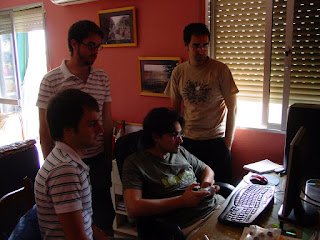 This must be me showing some noticeable advances on the gameplay to rest.
Well this is all I can tell you for now. The game is still a 'secret' until we send it to the free, will be occurring on July, 2nd.
Hope you enjoyed the pics!
 Here you see Globero and Cerberus, probably testing the game in my PC. On the back is Vic, Qapitan's girlfriend who's kind enough to came to help in this hard hours.
 This guy is Qapitan, the Design Leader (artist director) who's is having some serious work on the GUI design. Notice he's wearing a Microsoft cap, probably trying to catch the attention of our future (with a bit of look) publishers ;)
 This is a better view of Vic, who is helping us to get the different team Logos ready for the deadline. I hope she's enjoying the experience, and maybe considering to be part of the team on the near future. On the back, Globero and I are implementing some stuff I can't remember right now.
 This is Zelldweller, the 3D whore. He's doing the hi-poly models that will be used to generate the normalmaps.
 This is me preparing to implement something a bit more complicated than usuall (can't remember what). You can see I'm planning down on my scratch book, before getting into the actual coding.
 This is the complete 2D team, Garander, Prisim and Qapitan. They seem very busy, isnt't it?
 This must be me showing some noticeable advances on the gameplay to rest.
Well this is all I can tell you for now. The game is still a 'secret' until we send it to the free, will be occurring on July, 2nd.
Hope you enjoyed the pics!
lunes, diciembre 12, 2005
Hoy, bricomania con-solera
XBOX360 VGA/TV MOD CABLE
Vamos a convertir un cable original de XBOX360 (compatible con video compuesto para TV y video por componentes para HDTV) en un cable Video Compuesto + VGA, y vamos a añadirle un interruptor para cambiar entre ambos modos.
El objetivo es conseguir un cable que puedas usar tanto en una TV ordinaria como en el monitor del PC, con audio analógico (en el cable TV) y la salida optica original.
Este MOD es el fruto de un par de tardes muy entretenidas. Globero es el que lo intentó en primera ocasión con mi cable original, y yo lo he vuelto a intentar hoy en el cable de Ashashikun. En ambos casos ha funcionado bastante bien, aunque Ashshikun ha encontrado algunas incompatibilidades con su monitor de plasma. Les doy las gracias a ambos.
A telefónica: Ponedle ya teléfono al Globero joder, que no nos podemos picar al PGR3 por vuestra culpa mamones!

1) Estos son los materiales que vamos a utilizar, a parte del cable TV/HDTV (que viene con la 360).
a) Un alargadera VGA, a la que le hemos cortado el extremo Hembra y le hemos pelado los cables.
b) Un conmutador doble (un interruptor que cierra 2 circuitos al mismo tiempo)
c ) Tambien vamos a necesitar 4 cables, para unir el conmutador con los interruptores. Podéis usar cualquier tipo de cable, pero os recomiendo usar un trozo de un cable IDE.

2) Procedemos a desmontar el conector TV/HDTV utilizando una navaja o un cuchillo. Basta meterle un poco de caña por la parte de abajo y luego seguir conforme se van abriendo huecos.

3) Aqui tenemos el interior del conector, ahora procedemos a desmontar la jaula metálica que lo envuelve

4) Tenemos que empezar por abrir la base del conector, que está apresando el cable, y la tapa de la jaula metálica

5) A continuación con la ayuda del soldador, raspamos las soldaduras que unen la parte superior con la inferior de la jaula

6) Ahora tenemos el conector abierto, por lo que nos queda es sacar el conector que va a la pequeña placa de la parte superior y terminar de desmontarlo

7) Aqui tenemos el conector totalmente desmontado.

8) El siguiente paso es quitar con la navaja (quizás mejor con una pinzas si las tenéis a mano) el pegamento que recubre los conectores.

9) Procedemos a cortar los hilos naranja-blanco, verde-blanco y amarillo-blanco del pequeño conector que va a la placa. Estos hilos son lo que permiten connmutar entre TV y HDTV (ya no vamos a necesitarlos).

10) Localizamos un puente soldado "a jierro" en el conector entre los pines 17 y 18. Este puente también es responsable de conmutar al modo TV/HDTV.

11) Procedemos a desoldar el puente entre los pines 17 y 18. ¡No os deshagais del cable, vamos a usarlo en paso siguiente! También desoldaremos el cable naranja-blanco del pin 21.

12) Procedemos a soldar denuevo el cablecito, esta vez en los pines 21 y 22. Con esto estamos forzando el modo VGA.

13) A continuación preparamos nuestros 4 cables. Hemos cortado un trozo (de 4 hilos de grosor) de un cable IDE y le hemos pelados los extremos. No hace falta que sea muy largo.

14) Vamos a hacer sitio en el conector, desoldando los cables verde-blanco y amarillo blanco (ya no se estan usando, los cortamos en el paso 9)

15) Procedemos a soldar 4 cables del mismo extremo a los puntos 20, 19, 18 y 17. Más adelante uniremos los otros 4 extremos al conmutador.

16) Ahora vamos a prepar el cable VGA. Pelamos los 5 hilos que van tierra (pines: ).

17) Unimos estos cables entre sí.

16) Procedemos a soldar los 6 pines necesarios siguiendo los esquemas:
Listado de Pines Xbox Connector:
Pin
2 - *ground
5 - to VGA pin 15
8 - to your Audio Out (Right channel)
9 - *ground
10 - to VGA pin 13
11 - *ground
14 - to VGA pin 1
15 - *ground
21 - link to 22
22 - link to 21
23 - to your Audio Out (Left channel)
24 - *ground
25 - to VGA pin 14
26 - *ground
27 - to VGA pin 3
28 - *ground
29 - to VGA pin 2
30 - *ground
* - connect all ground together
VGA Connector:
Pin
1 - to xbox360 pin 14
2 - to xbox360 pin 29
3 - to xbox360 pin 27
5 - *ground
6 - *ground
7 - *ground
8 - *ground
10 - *ground
13 - to xbox360 pin 10
14 - to xbox360 pin 25
15 - to xbox360 pin 5
* - connect all ground together

17) Este es el aspecto del conector una vez hemos realizado todas las 6 soldaduras.

18) A continuación soldamos el conmutador al cable de 4 hilos, teniendo en cuenta que lo que pretendemos es cortocircuitear el pin 20 con el 19, y el pin 18 con el 17, simultaneamente.

19) Utilizando unos alicates procedemos a doblar hacia arriba el lateral de la jaula. Tiene que se el lado que tiene el interruptor original del conector, ya que por ahí es por donde saldrá el cable VGA.

20) Tiene que que quedar mas o menos así. Procedemos cerrar la jaula del conector.

21) Probablemente no encaje bien, asi que tendremos que ajustarlo usando cinta aislante. Aprovechamos para fijar el conmutador al cable, para que sea más fácil accionarlo.

22) Ya tenemos nuestro conector finalizado! A disfrutarlo!
bye!
Vamos a convertir un cable original de XBOX360 (compatible con video compuesto para TV y video por componentes para HDTV) en un cable Video Compuesto + VGA, y vamos a añadirle un interruptor para cambiar entre ambos modos.
El objetivo es conseguir un cable que puedas usar tanto en una TV ordinaria como en el monitor del PC, con audio analógico (en el cable TV) y la salida optica original.
Este MOD es el fruto de un par de tardes muy entretenidas. Globero es el que lo intentó en primera ocasión con mi cable original, y yo lo he vuelto a intentar hoy en el cable de Ashashikun. En ambos casos ha funcionado bastante bien, aunque Ashshikun ha encontrado algunas incompatibilidades con su monitor de plasma. Les doy las gracias a ambos.
A telefónica: Ponedle ya teléfono al Globero joder, que no nos podemos picar al PGR3 por vuestra culpa mamones!
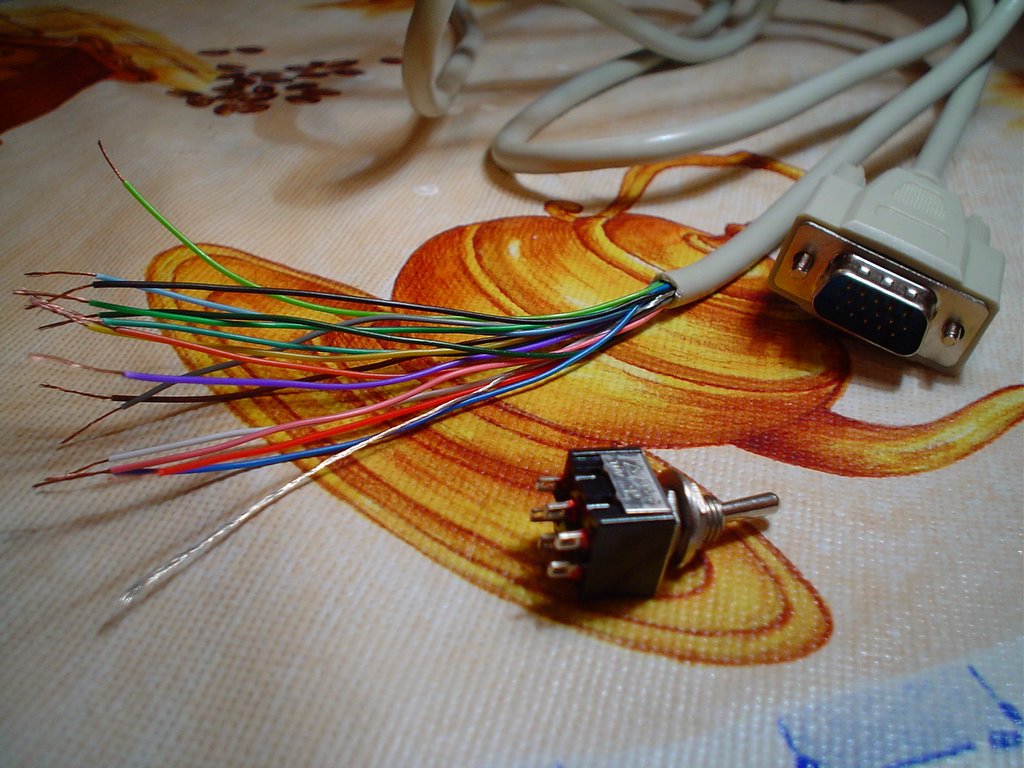
1) Estos son los materiales que vamos a utilizar, a parte del cable TV/HDTV (que viene con la 360).
a) Un alargadera VGA, a la que le hemos cortado el extremo Hembra y le hemos pelado los cables.
b) Un conmutador doble (un interruptor que cierra 2 circuitos al mismo tiempo)
c ) Tambien vamos a necesitar 4 cables, para unir el conmutador con los interruptores. Podéis usar cualquier tipo de cable, pero os recomiendo usar un trozo de un cable IDE.

2) Procedemos a desmontar el conector TV/HDTV utilizando una navaja o un cuchillo. Basta meterle un poco de caña por la parte de abajo y luego seguir conforme se van abriendo huecos.
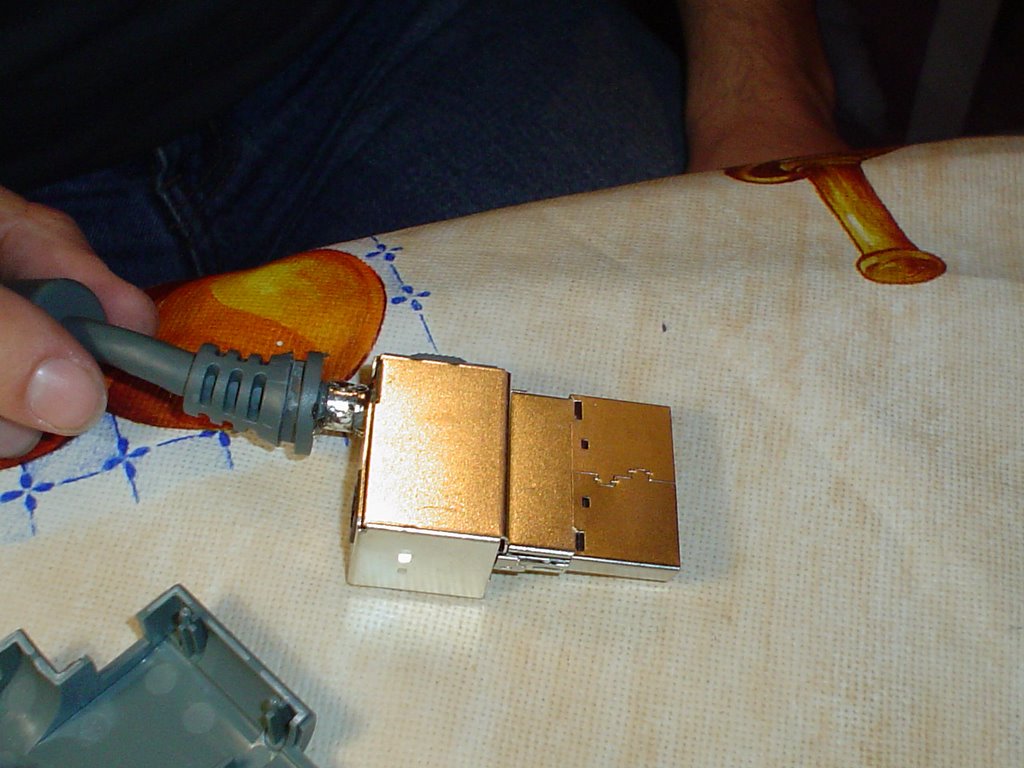
3) Aqui tenemos el interior del conector, ahora procedemos a desmontar la jaula metálica que lo envuelve

4) Tenemos que empezar por abrir la base del conector, que está apresando el cable, y la tapa de la jaula metálica
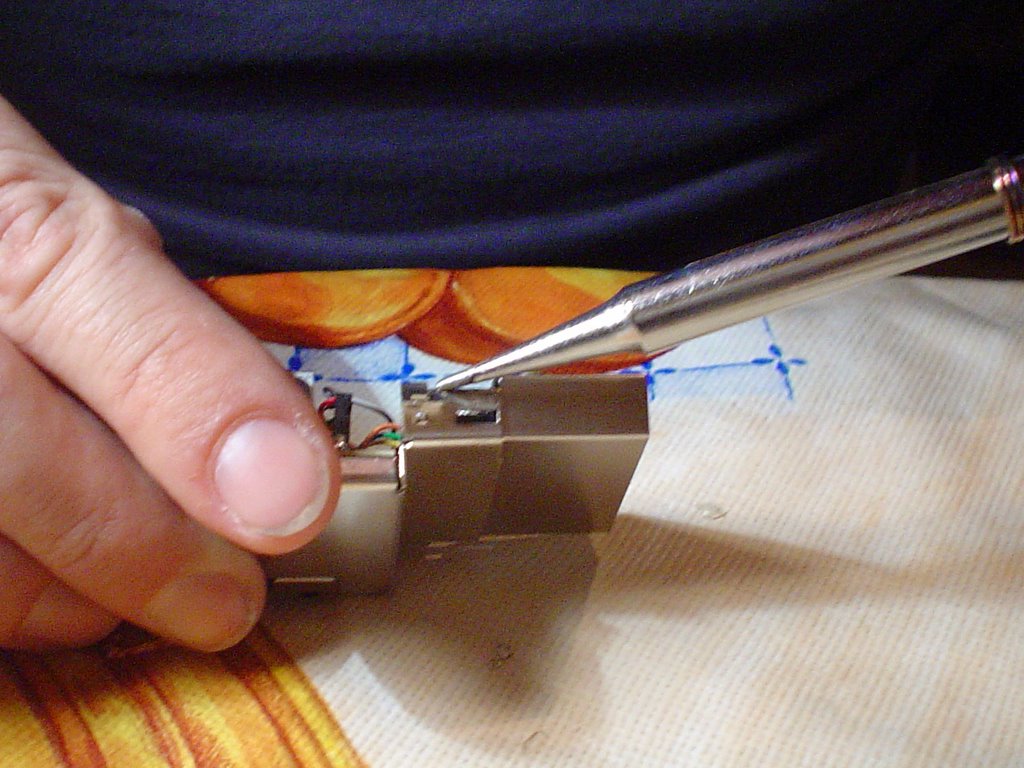
5) A continuación con la ayuda del soldador, raspamos las soldaduras que unen la parte superior con la inferior de la jaula
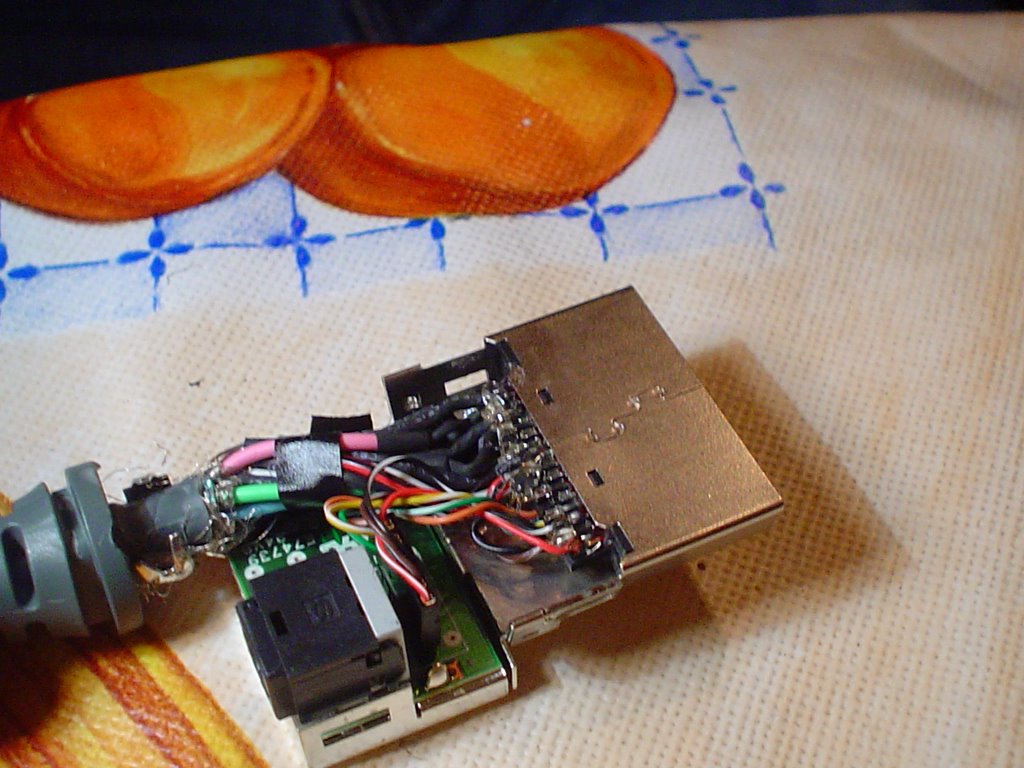
6) Ahora tenemos el conector abierto, por lo que nos queda es sacar el conector que va a la pequeña placa de la parte superior y terminar de desmontarlo

7) Aqui tenemos el conector totalmente desmontado.
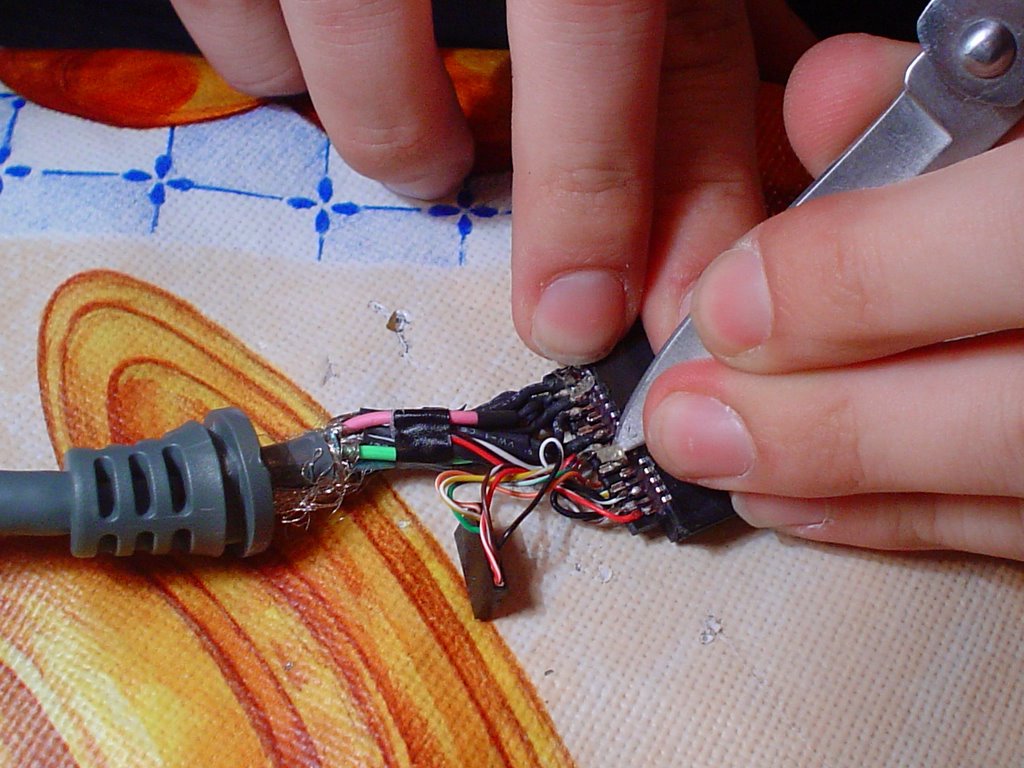
8) El siguiente paso es quitar con la navaja (quizás mejor con una pinzas si las tenéis a mano) el pegamento que recubre los conectores.
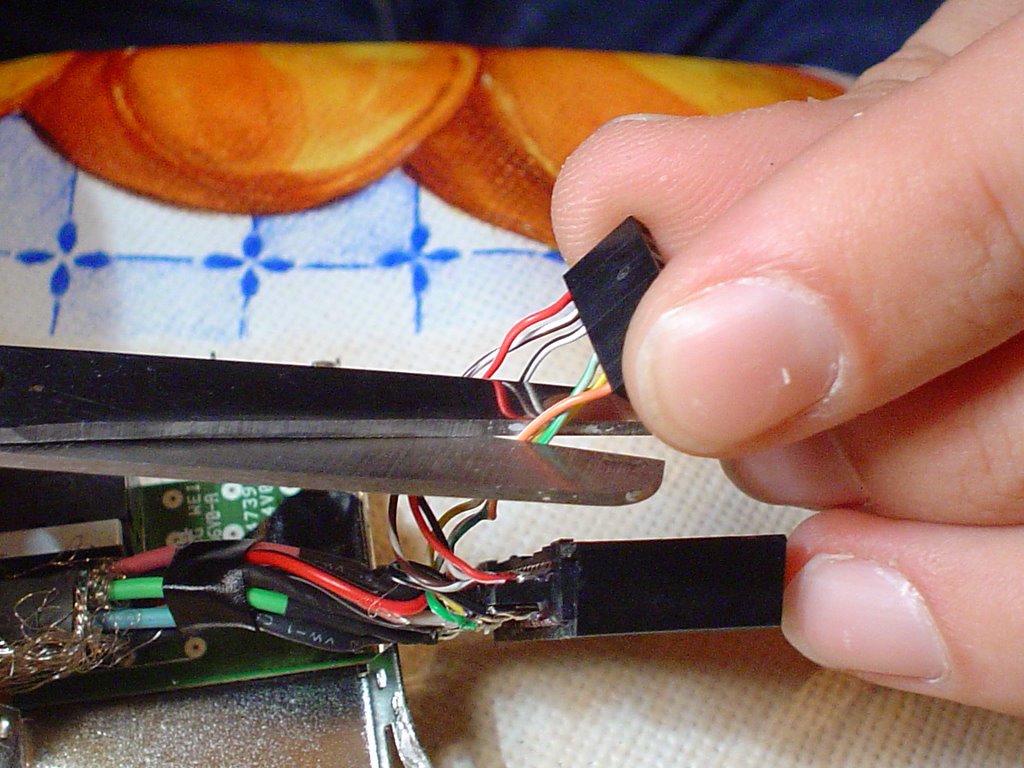
9) Procedemos a cortar los hilos naranja-blanco, verde-blanco y amarillo-blanco del pequeño conector que va a la placa. Estos hilos son lo que permiten connmutar entre TV y HDTV (ya no vamos a necesitarlos).
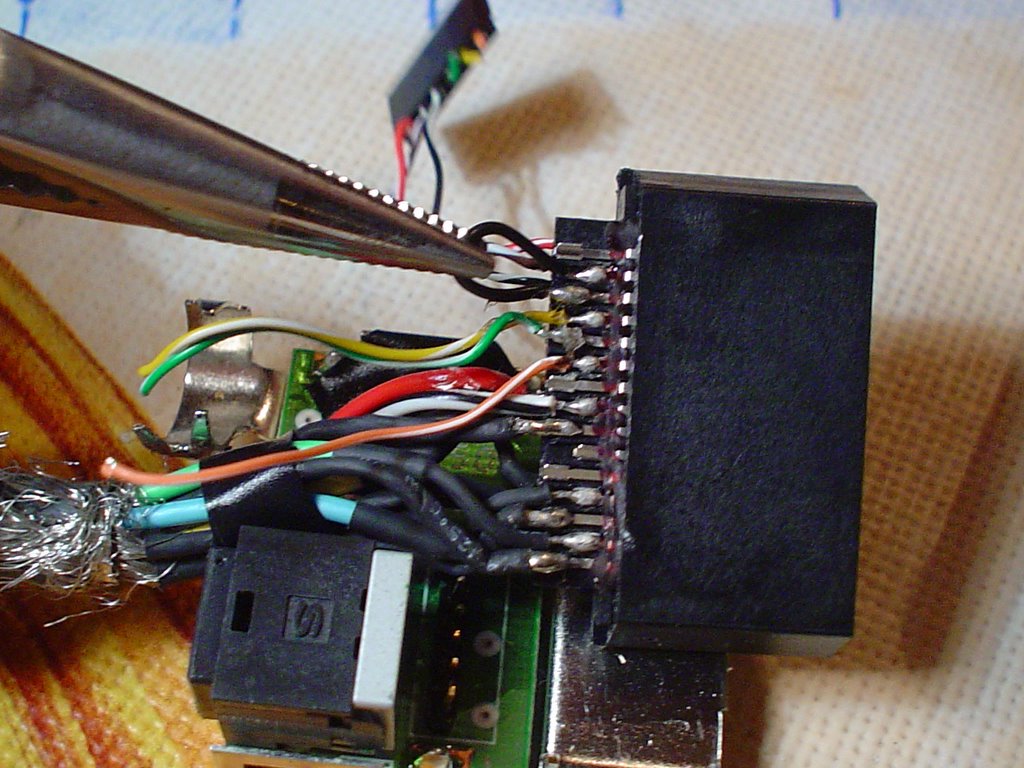
10) Localizamos un puente soldado "a jierro" en el conector entre los pines 17 y 18. Este puente también es responsable de conmutar al modo TV/HDTV.
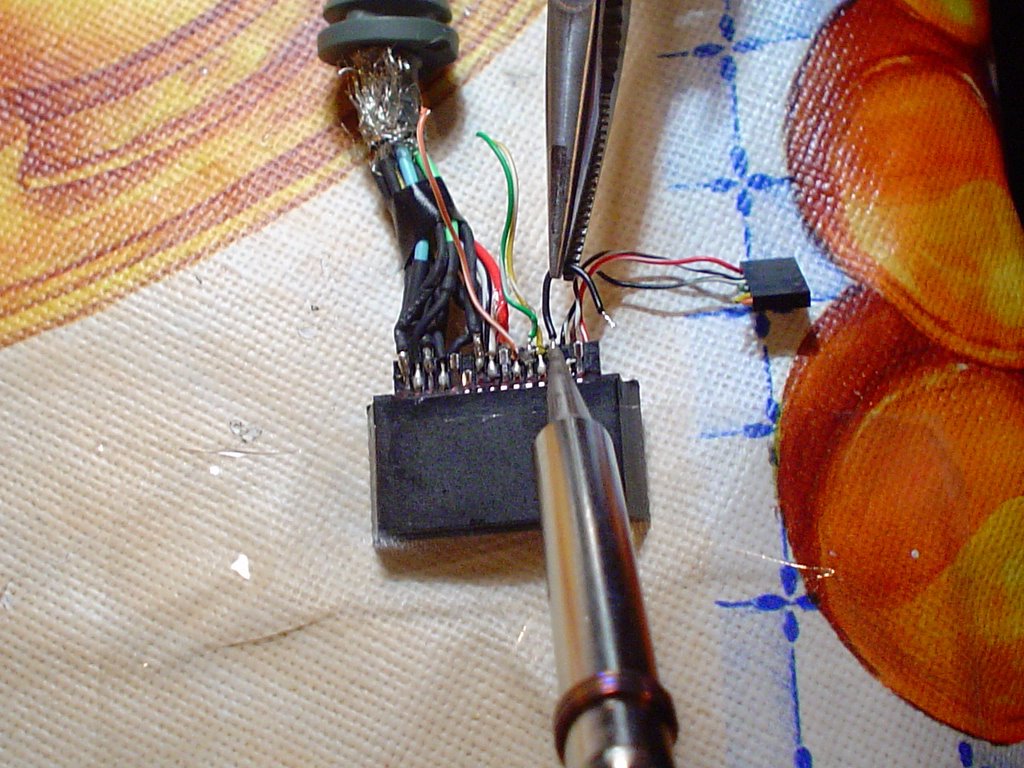
11) Procedemos a desoldar el puente entre los pines 17 y 18. ¡No os deshagais del cable, vamos a usarlo en paso siguiente! También desoldaremos el cable naranja-blanco del pin 21.

12) Procedemos a soldar denuevo el cablecito, esta vez en los pines 21 y 22. Con esto estamos forzando el modo VGA.

13) A continuación preparamos nuestros 4 cables. Hemos cortado un trozo (de 4 hilos de grosor) de un cable IDE y le hemos pelados los extremos. No hace falta que sea muy largo.
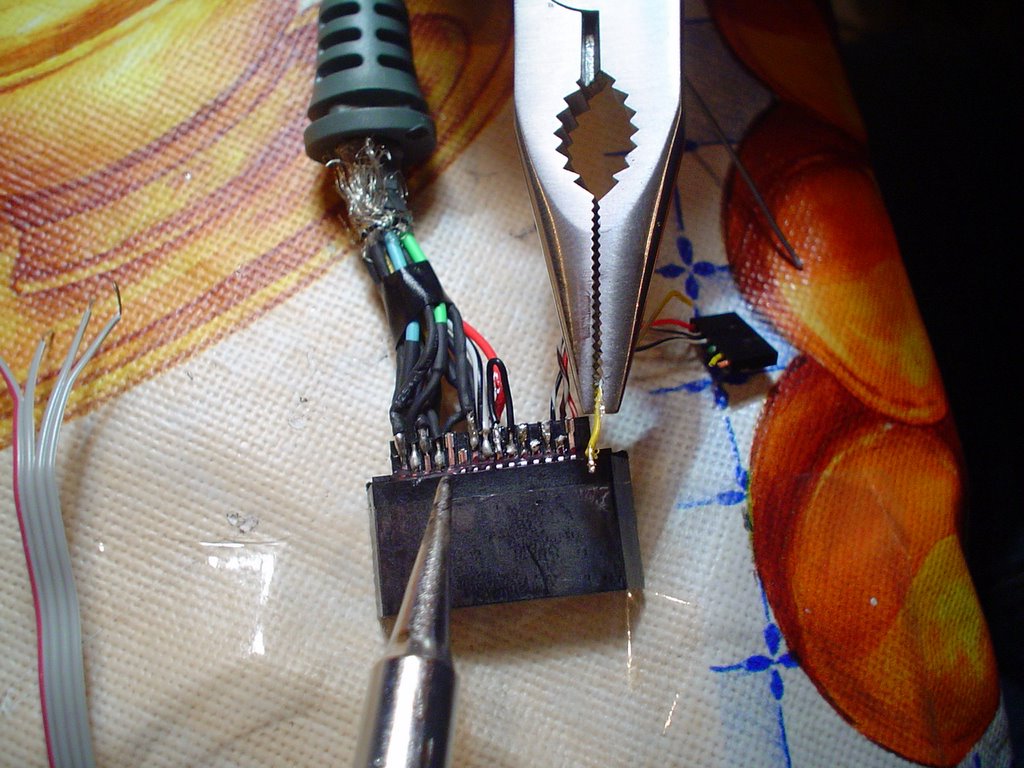
14) Vamos a hacer sitio en el conector, desoldando los cables verde-blanco y amarillo blanco (ya no se estan usando, los cortamos en el paso 9)
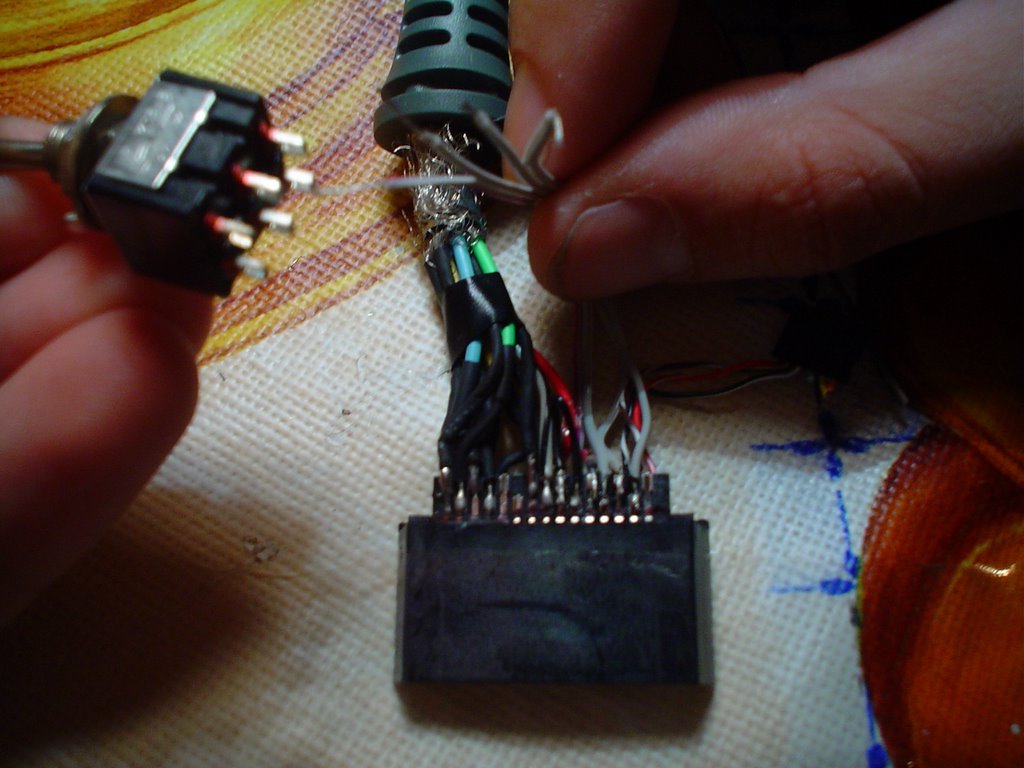
15) Procedemos a soldar 4 cables del mismo extremo a los puntos 20, 19, 18 y 17. Más adelante uniremos los otros 4 extremos al conmutador.
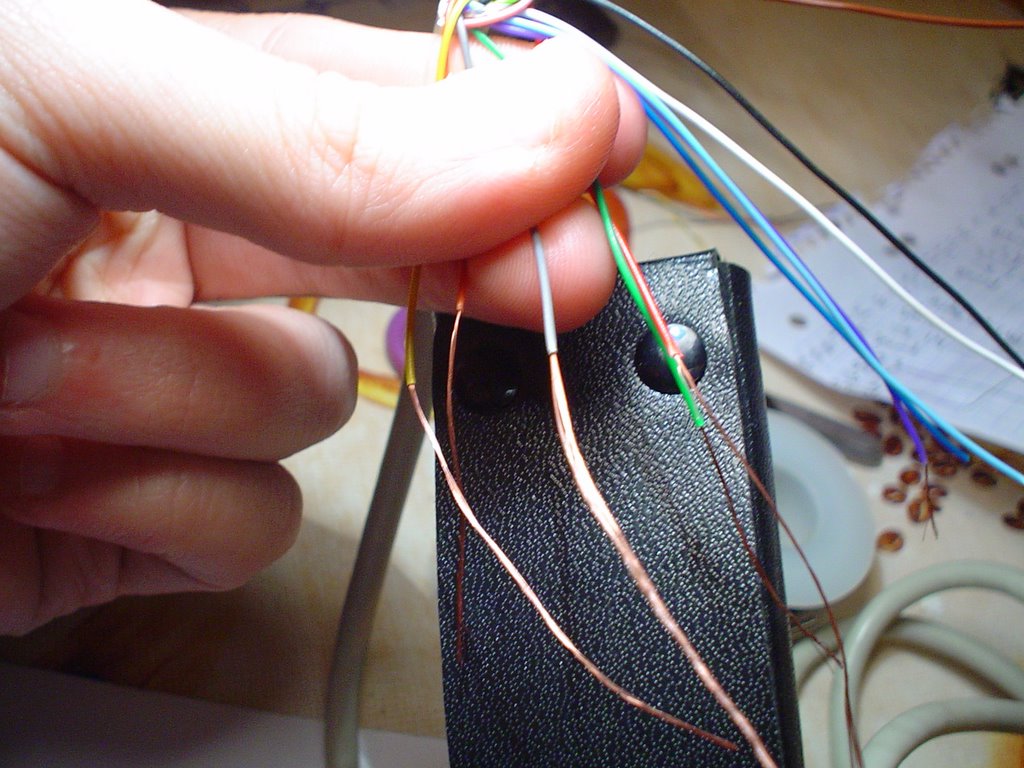
16) Ahora vamos a prepar el cable VGA. Pelamos los 5 hilos que van tierra (pines: ).
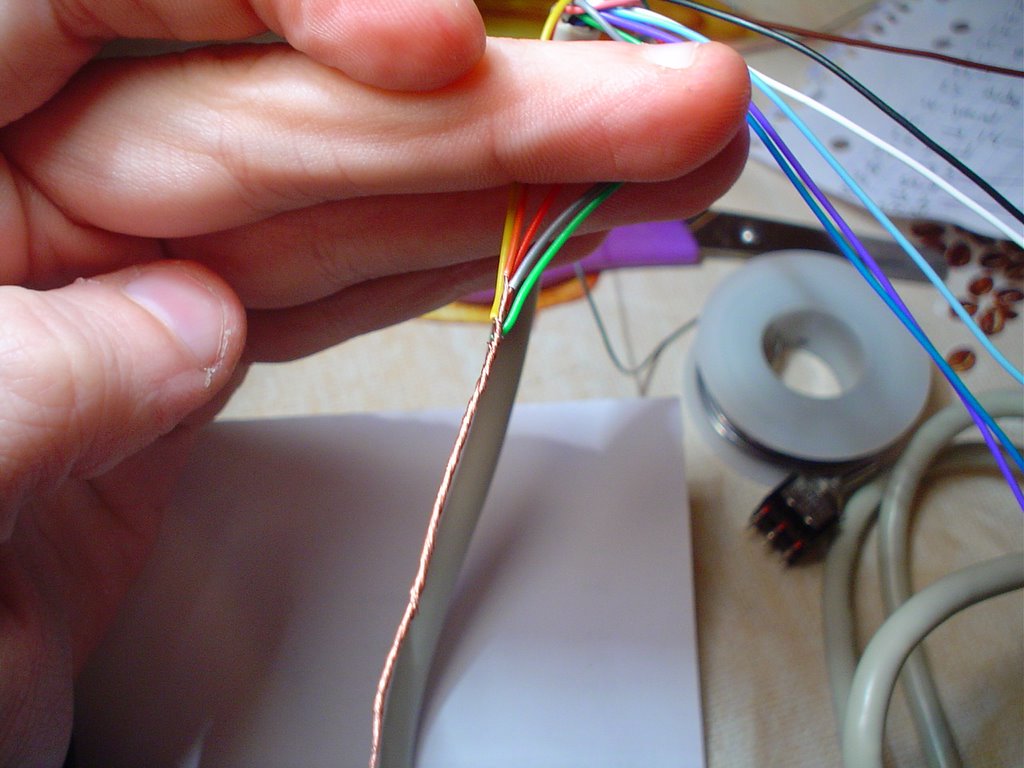
17) Unimos estos cables entre sí.
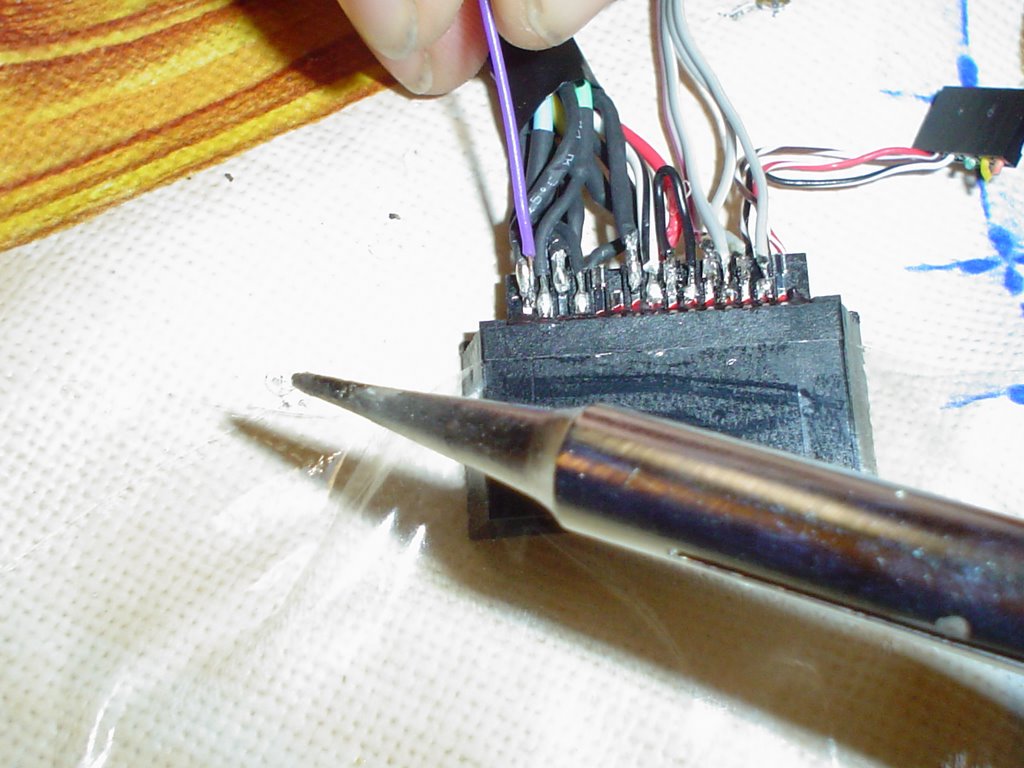
16) Procedemos a soldar los 6 pines necesarios siguiendo los esquemas:
Listado de Pines Xbox Connector:
Pin
2 - *ground
5 - to VGA pin 15
8 - to your Audio Out (Right channel)
9 - *ground
10 - to VGA pin 13
11 - *ground
14 - to VGA pin 1
15 - *ground
21 - link to 22
22 - link to 21
23 - to your Audio Out (Left channel)
24 - *ground
25 - to VGA pin 14
26 - *ground
27 - to VGA pin 3
28 - *ground
29 - to VGA pin 2
30 - *ground
* - connect all ground together
VGA Connector:
Pin
1 - to xbox360 pin 14
2 - to xbox360 pin 29
3 - to xbox360 pin 27
5 - *ground
6 - *ground
7 - *ground
8 - *ground
10 - *ground
13 - to xbox360 pin 10
14 - to xbox360 pin 25
15 - to xbox360 pin 5
* - connect all ground together
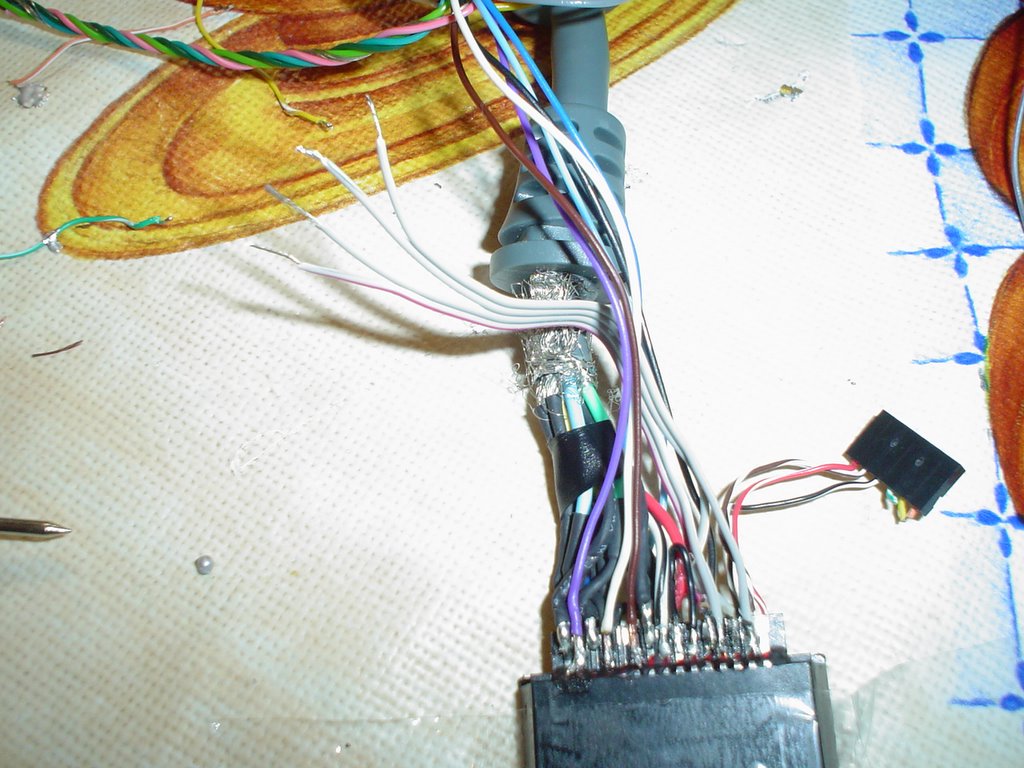
17) Este es el aspecto del conector una vez hemos realizado todas las 6 soldaduras.
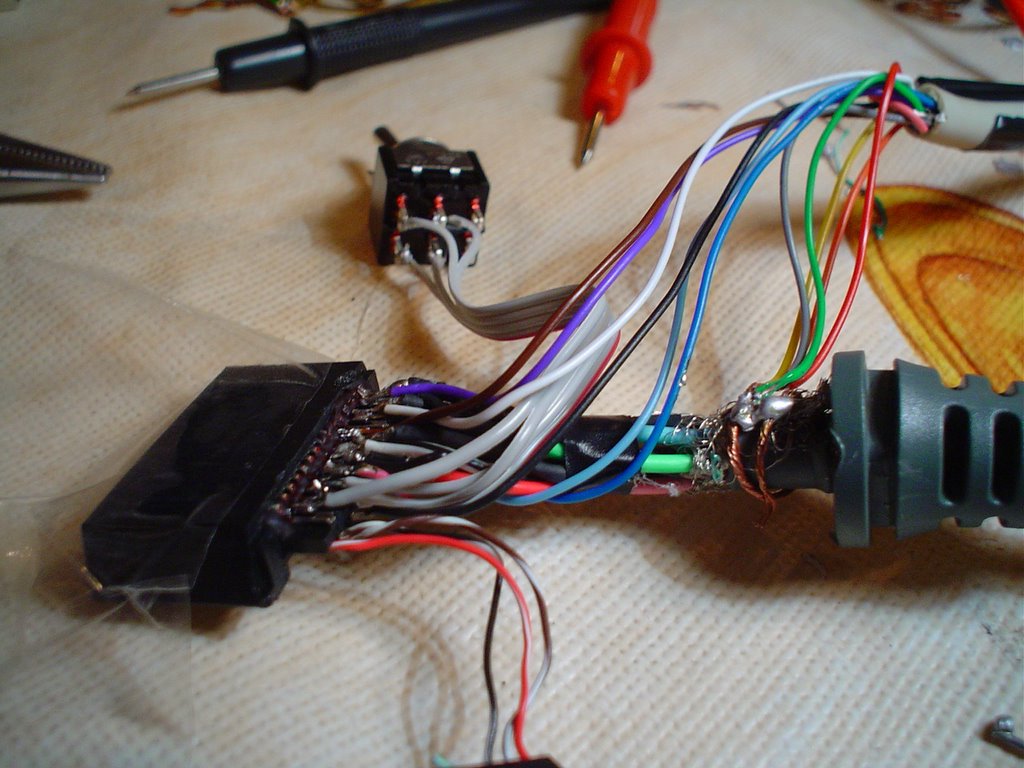
18) A continuación soldamos el conmutador al cable de 4 hilos, teniendo en cuenta que lo que pretendemos es cortocircuitear el pin 20 con el 19, y el pin 18 con el 17, simultaneamente.

19) Utilizando unos alicates procedemos a doblar hacia arriba el lateral de la jaula. Tiene que se el lado que tiene el interruptor original del conector, ya que por ahí es por donde saldrá el cable VGA.

20) Tiene que que quedar mas o menos así. Procedemos cerrar la jaula del conector.
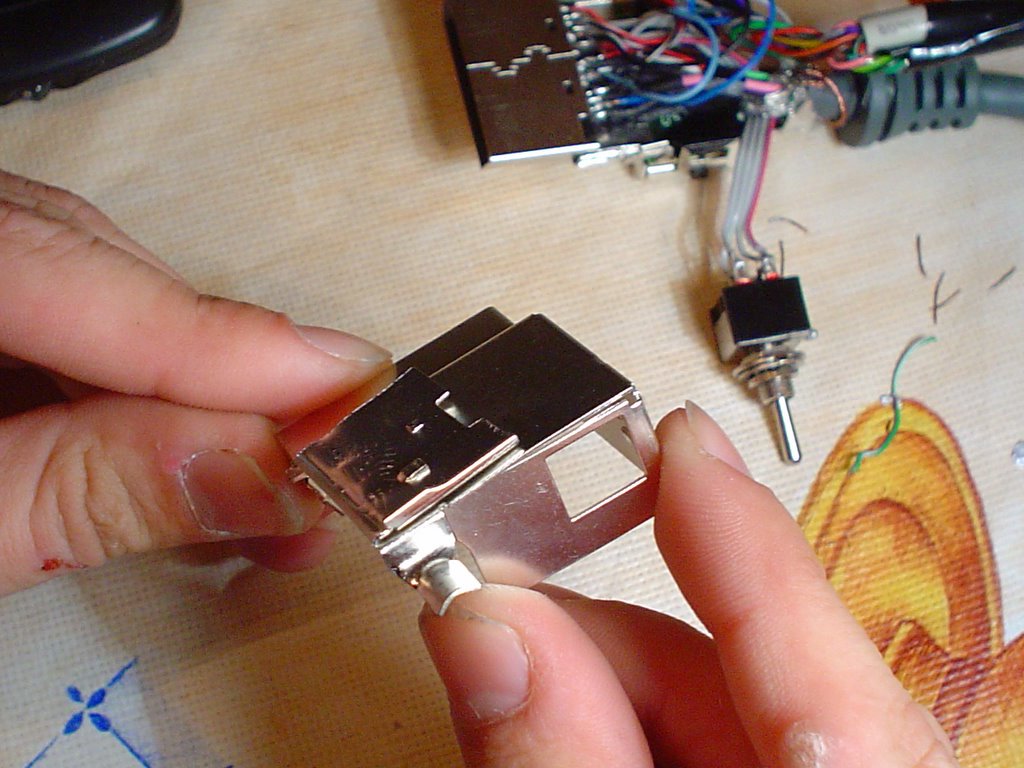
21) Probablemente no encaje bien, asi que tendremos que ajustarlo usando cinta aislante. Aprovechamos para fijar el conmutador al cable, para que sea más fácil accionarlo.

22) Ya tenemos nuestro conector finalizado! A disfrutarlo!
bye!
viernes, noviembre 18, 2005
Depuración ASP 3.0 usando Visual Studio .Net 2003
Por mucho que uno pretenda estar a la última en tecnologías de desarrollo, al final acaba envuelto en proyectos "desactualizados" en los que priman las tecnologías obsoletas y las "malas artes de programación". En este caso me estoy refiriendo a ASP 3.0, tecnología que desgraciadamente se popularizó in-extremis en el mundo de los negocios.
Si tenéis la desgracia de tener que retomar antiguos proyectos realizados en esta tecnología, aqui os brindo un método para "activar" la depuración integrada en Visual Studio .Net 2003 (VS2003) y utilizar esta herramienta (a cuyo IDE y "facilidades" todos estamos más que habituados) para desarrollar y trabajar airosamente con ASP 3.0.
En primer lugar, necesitaréis:
- Windows XP o 2000 con IIS
- Visual Studio 2003 con VB.NET instalado (no he probado si funciona sólo con C# sólo)
- Un proyecto a arreglar o ampliar realizado en ASP 3.0 (con versiones anteriores también es posible que funcione), partimos de la base de que el proyecto en IIS está creado y funcionando ok?
1º PASO:
- Configurar el proyecto de IIS:
- Pestaña "Directorio Virtual"
- Aplicación correctamente creada, con su nombre puesto
- Pulsamos sobre "configuración" y en la pestaña "Depuración" activamos la casilla: "Habilitar depuracion de secuancias de comados ASP en el servidor", mientras que dejamos desmarcada la casilla de depuración en el cliente.
- Aplicamos los cambios
2º PASO:
- Seguridad:
- En "Panel de Control", "Herramientas Administrativas", "Administración de Equipos", "Usuarios Locales y Grupos":
- Editamos el grupo "Usuarios del Depurador" y le añadimos los usuarios del IIS:
IWAN_{NOMBREMAQUINA},
IUSR_{NOMBREMAQUINA}
3º PASO:
- Configuración ASP.NET
- Localizamos el fichero "machine.config"
(típicamente: C:\WINDOWS\Microsoft.NET\Framework\v1.1.4322\CONFIG\machine.config)
- Editamos el fichero, localizamos la clave "processModel" que debe contener algo parecido a:
processModel enable="true" timeout="Infinite" idleTimeout="Infinite" shutdownTimeout="0:00:05" requestLimit="Infinite" requestQueueLimit="5000" restartQueueLimit="10" memoryLimit="60" webGarden="false" cpuMask="0xffffffff" userName="machine" password="AutoGenerate" logLevel="Errors" clientConnectedCheck="0:00:05" comAuthenticationLevel="Connect" comImpersonationLevel="Impersonate" responseDeadlockInterval="00:03:00" maxWorkerThreads="20" maxIoThreads="20"
- sustituímos el valor userName="machine", por userName="SYSTEM"
4º PASO:
- Reiniciamos la máquina (importante, no saltarse este paso por que es inprescindible, no es coña)
5º PASO:
- Abrimos VS2003 y creamos un nuevo proyecto de Visual Basic, del tipo "Nuevo Proyecto en Carpeta Existente"
- Nos aparece un asistente en que tendremos que dar un nombre al proyecto, y posteriormente nos pide la localización del proyecto, en nuestro caso será algo como "http://localhost/nombreproyecto"
6º PASO:
- Una vez creado el proyecto, nos aparece vacío, deberemos incluir los ficheros .ASP existentes, para lo cual en el Explorador de Soluciones pulsamos sobre el icono para mostrar todos los archivos, e incluimos todos los archivos que queramos
- Lo único que nos falta es configurar el Proyecto de VS para activar la depuración ASP, nos vamos a las propiedades del proyecto, y en la sección "Propiedades de Configuracion / Depuración", activamos la casilla "Depuración ASP" y desactivamos la casilla "Depuracion ASP.NET"
- Voilá, el proyecto está listo para ser depurado!
FINAL:
Espero que lo que aquí cuento le sirva a más de uno, para dejar de darse chocázos contra ASP y a terminar sus tareas a tiempo de volver a casita a su hora. Gracias por vuestra atención!
Si tenéis la desgracia de tener que retomar antiguos proyectos realizados en esta tecnología, aqui os brindo un método para "activar" la depuración integrada en Visual Studio .Net 2003 (VS2003) y utilizar esta herramienta (a cuyo IDE y "facilidades" todos estamos más que habituados) para desarrollar y trabajar airosamente con ASP 3.0.
En primer lugar, necesitaréis:
- Windows XP o 2000 con IIS
- Visual Studio 2003 con VB.NET instalado (no he probado si funciona sólo con C# sólo)
- Un proyecto a arreglar o ampliar realizado en ASP 3.0 (con versiones anteriores también es posible que funcione), partimos de la base de que el proyecto en IIS está creado y funcionando ok?
1º PASO:
- Configurar el proyecto de IIS:
- Pestaña "Directorio Virtual"
- Aplicación correctamente creada, con su nombre puesto
- Pulsamos sobre "configuración" y en la pestaña "Depuración" activamos la casilla: "Habilitar depuracion de secuancias de comados ASP en el servidor", mientras que dejamos desmarcada la casilla de depuración en el cliente.
- Aplicamos los cambios
2º PASO:
- Seguridad:
- En "Panel de Control", "Herramientas Administrativas", "Administración de Equipos", "Usuarios Locales y Grupos":
- Editamos el grupo "Usuarios del Depurador" y le añadimos los usuarios del IIS:
IWAN_{NOMBREMAQUINA},
IUSR_{NOMBREMAQUINA}
3º PASO:
- Configuración ASP.NET
- Localizamos el fichero "machine.config"
(típicamente: C:\WINDOWS\Microsoft.NET\Framework\v1.1.4322\CONFIG\machine.config)
- Editamos el fichero, localizamos la clave "processModel" que debe contener algo parecido a:
processModel enable="true" timeout="Infinite" idleTimeout="Infinite" shutdownTimeout="0:00:05" requestLimit="Infinite" requestQueueLimit="5000" restartQueueLimit="10" memoryLimit="60" webGarden="false" cpuMask="0xffffffff" userName="machine" password="AutoGenerate" logLevel="Errors" clientConnectedCheck="0:00:05" comAuthenticationLevel="Connect" comImpersonationLevel="Impersonate" responseDeadlockInterval="00:03:00" maxWorkerThreads="20" maxIoThreads="20"
- sustituímos el valor userName="machine", por userName="SYSTEM"
4º PASO:
- Reiniciamos la máquina (importante, no saltarse este paso por que es inprescindible, no es coña)
5º PASO:
- Abrimos VS2003 y creamos un nuevo proyecto de Visual Basic, del tipo "Nuevo Proyecto en Carpeta Existente"
- Nos aparece un asistente en que tendremos que dar un nombre al proyecto, y posteriormente nos pide la localización del proyecto, en nuestro caso será algo como "http://localhost/nombreproyecto"
6º PASO:
- Una vez creado el proyecto, nos aparece vacío, deberemos incluir los ficheros .ASP existentes, para lo cual en el Explorador de Soluciones pulsamos sobre el icono para mostrar todos los archivos, e incluimos todos los archivos que queramos
- Lo único que nos falta es configurar el Proyecto de VS para activar la depuración ASP, nos vamos a las propiedades del proyecto, y en la sección "Propiedades de Configuracion / Depuración", activamos la casilla "Depuración ASP" y desactivamos la casilla "Depuracion ASP.NET"
- Voilá, el proyecto está listo para ser depurado!
FINAL:
Espero que lo que aquí cuento le sirva a más de uno, para dejar de darse chocázos contra ASP y a terminar sus tareas a tiempo de volver a casita a su hora. Gracias por vuestra atención!
miércoles, julio 20, 2005
VOLLUTION VIDEOGAMES STUDIO
Durante los dos últimos meses he estado concentrando mis esfuerzos en la creacion de un grupo de desarrollo de videojuegos, que me permita en un futuro reconducir mi carrera profesional hacia el sector del multimedia y los videojuegos.
Actualmente, el grupo está compuesto por ocho personas. Los grafístas serán Dani (dibujante) y Migue (modelador 3d). En la música tenemos a Carlos, Raquel y Dave. Y a la hora de programar, somos tres: Jorge, Hicham y yo (Mauri). Adicionalmente, varias personas se han ofrecido para colaborar en nuestro objetivo.
Tras barajar muchas posibilidades, finalmente tomamos el nombre de "Vollution", a falta de decidir la coletilla que se usará ("Studios", "Videogames", "Entertainment", etc.) para darle un toquecillo pro.
Nuestro primer proyecto va a ser una version 3D del clásico de recreativas Neo-Geo "Windjammers", un éxistoso arcade de finales de los 80 repleto de acción y adicción. Esperamos tener lo que hay que tener para honrar a los creadores del juego con un producto de calidad.
Ahora mismo estamos enfrascados en la constitución del grupo. Queremos decidir una buena base estatutaría que nos permita trabajar a distancia, tomar decisiones y en definitiva afrontar todo tipo de proyectos. Como parte de esta base, tenemos la complicada tarea de detectar la responsabilidades necesarias y otorgarselas a la persona adecuada. También estamos diseñando una Intranet para tener organizado al grupo, y controlado el proceso de producción.
Próximamente se estará on-line la web del grupo, y empezaréis a tener noticias de nuestros avances!
Actualmente, el grupo está compuesto por ocho personas. Los grafístas serán Dani (dibujante) y Migue (modelador 3d). En la música tenemos a Carlos, Raquel y Dave. Y a la hora de programar, somos tres: Jorge, Hicham y yo (Mauri). Adicionalmente, varias personas se han ofrecido para colaborar en nuestro objetivo.
Tras barajar muchas posibilidades, finalmente tomamos el nombre de "Vollution", a falta de decidir la coletilla que se usará ("Studios", "Videogames", "Entertainment", etc.) para darle un toquecillo pro.
Nuestro primer proyecto va a ser una version 3D del clásico de recreativas Neo-Geo "Windjammers", un éxistoso arcade de finales de los 80 repleto de acción y adicción. Esperamos tener lo que hay que tener para honrar a los creadores del juego con un producto de calidad.
Ahora mismo estamos enfrascados en la constitución del grupo. Queremos decidir una buena base estatutaría que nos permita trabajar a distancia, tomar decisiones y en definitiva afrontar todo tipo de proyectos. Como parte de esta base, tenemos la complicada tarea de detectar la responsabilidades necesarias y otorgarselas a la persona adecuada. También estamos diseñando una Intranet para tener organizado al grupo, y controlado el proceso de producción.
Próximamente se estará on-line la web del grupo, y empezaréis a tener noticias de nuestros avances!
jueves, junio 09, 2005
red vs. blue
HALO es uno de los mejores videojuegos de los ultimos años. La trama, los graficos, el cuidado apartado sonoro, la jugabilidad y adicción son algunos de sus punto fuertes. Aunque el primer HALO salió en Xbox hace más de 3 años, hace dos en PC (y finalmente la segunda haría aparición hace 7 u 8 meses) aun sigue existiendo una gran comunidad de jugadores habituales debido a las virtudes de su juego on-line.
Lo curioso de esto es que los jugadores, debido a las horas y horas de juego, han adquirido habilidad para ir más allá de las multiples formas de juego definidas (y de las posibles mediante su sistema de configuración editable) y han empezado a utilizar halo mas allá de sus fines originales.
En primer lugar tuve constancia de que habia jugadores de Halo (xbox) que se dedicaban a experimentar con la física del juego. Se especializaron en realizar piruetas con los vehiculos, saltos imposibles, llegar a sitios donde nadie pensó que se pudiera llegar, nisiquiera los creadores del juego. Por supuesto, grababan sus acrobacias en video y las distribuían por Internet.
Recientemente, he descubierto una movida en torno a Halo mucho mas elaborada y sobre todo INNOVADORA!. La cuestión es esta, una pandilla de jugadores organizados quedan para echar una partida de Halo on-line. Pero en lugar de seguir las normas del juego (capturar la bandera, matarse unos a otros, etc) lo que hacen es "interpretar" un guión. Uno de los jugadores hace la veces de camara, mientra que los otros son los actores. Como resultado, tenemos la primera "serie de animacion" creado usando el modo multiplayer de un videojuego!
Y bueno, a parte de lo innovador (yo no tenía ni idea de que esto se hacia, pero igual habría que investigar si es una idea de ellos, o si por ahi se ha hecho antes) resulta que los guiones estan escritos con un hilarante sentido del humor, y la trama basada en el mundo Halo y en el de los multiplayers FPS en general, resulta muy entretenida.
La serie se llama "Red vs. Blue" y cuenta ya con 3 temporadas (57 episodios). La primera temporada la podéis descargar del EMULE subtitulada en español, de momento están los capitulos sueltos, pero en cuanto baje todos pondré un enlace al paquete completo.
Si queréis ver de que hablo, visitad la web de red vs. blue y bajar directamente alguno de los ultimos capitulos (en la web no están subtitulados al español). Aquí tenéis el enlace, directamente al FAQ para que lo leáis por vosotros mismos.
Lo curioso de esto es que los jugadores, debido a las horas y horas de juego, han adquirido habilidad para ir más allá de las multiples formas de juego definidas (y de las posibles mediante su sistema de configuración editable) y han empezado a utilizar halo mas allá de sus fines originales.
En primer lugar tuve constancia de que habia jugadores de Halo (xbox) que se dedicaban a experimentar con la física del juego. Se especializaron en realizar piruetas con los vehiculos, saltos imposibles, llegar a sitios donde nadie pensó que se pudiera llegar, nisiquiera los creadores del juego. Por supuesto, grababan sus acrobacias en video y las distribuían por Internet.
Recientemente, he descubierto una movida en torno a Halo mucho mas elaborada y sobre todo INNOVADORA!. La cuestión es esta, una pandilla de jugadores organizados quedan para echar una partida de Halo on-line. Pero en lugar de seguir las normas del juego (capturar la bandera, matarse unos a otros, etc) lo que hacen es "interpretar" un guión. Uno de los jugadores hace la veces de camara, mientra que los otros son los actores. Como resultado, tenemos la primera "serie de animacion" creado usando el modo multiplayer de un videojuego!
Y bueno, a parte de lo innovador (yo no tenía ni idea de que esto se hacia, pero igual habría que investigar si es una idea de ellos, o si por ahi se ha hecho antes) resulta que los guiones estan escritos con un hilarante sentido del humor, y la trama basada en el mundo Halo y en el de los multiplayers FPS en general, resulta muy entretenida.
La serie se llama "Red vs. Blue" y cuenta ya con 3 temporadas (57 episodios). La primera temporada la podéis descargar del EMULE subtitulada en español, de momento están los capitulos sueltos, pero en cuanto baje todos pondré un enlace al paquete completo.
Si queréis ver de que hablo, visitad la web de red vs. blue y bajar directamente alguno de los ultimos capitulos (en la web no están subtitulados al español). Aquí tenéis el enlace, directamente al FAQ para que lo leáis por vosotros mismos.
Suscribirse a:
Entradas (Atom)